


O DataSurgeon (ds) é uma ferramenta versátil projetada para resposta a incidentes, testes de penetração e desafios de CTF. Ele permite a extração de vários tipos de informações confidenciais , incluindo e-mails, números de telefone, hashes, cartões de crédito, URLs, endereços IP, endereços MAC, registros DNS SRV e muito mais!
wget -qO - https://www.stackoverflow.com | ds -F --clean | único

$ ./ds -m -T --hide -f /var/log/autodeauth/log
2023-02-26 00:28:19 - Sending 500 deauth frames to network: BC:2E:48:E5:DE:FF -- PrivateNetwork
2023-02-26 00:35:22 - Sending 500 deauth frames to network: 90:58:51:1C:C9:E1 -- TestNet
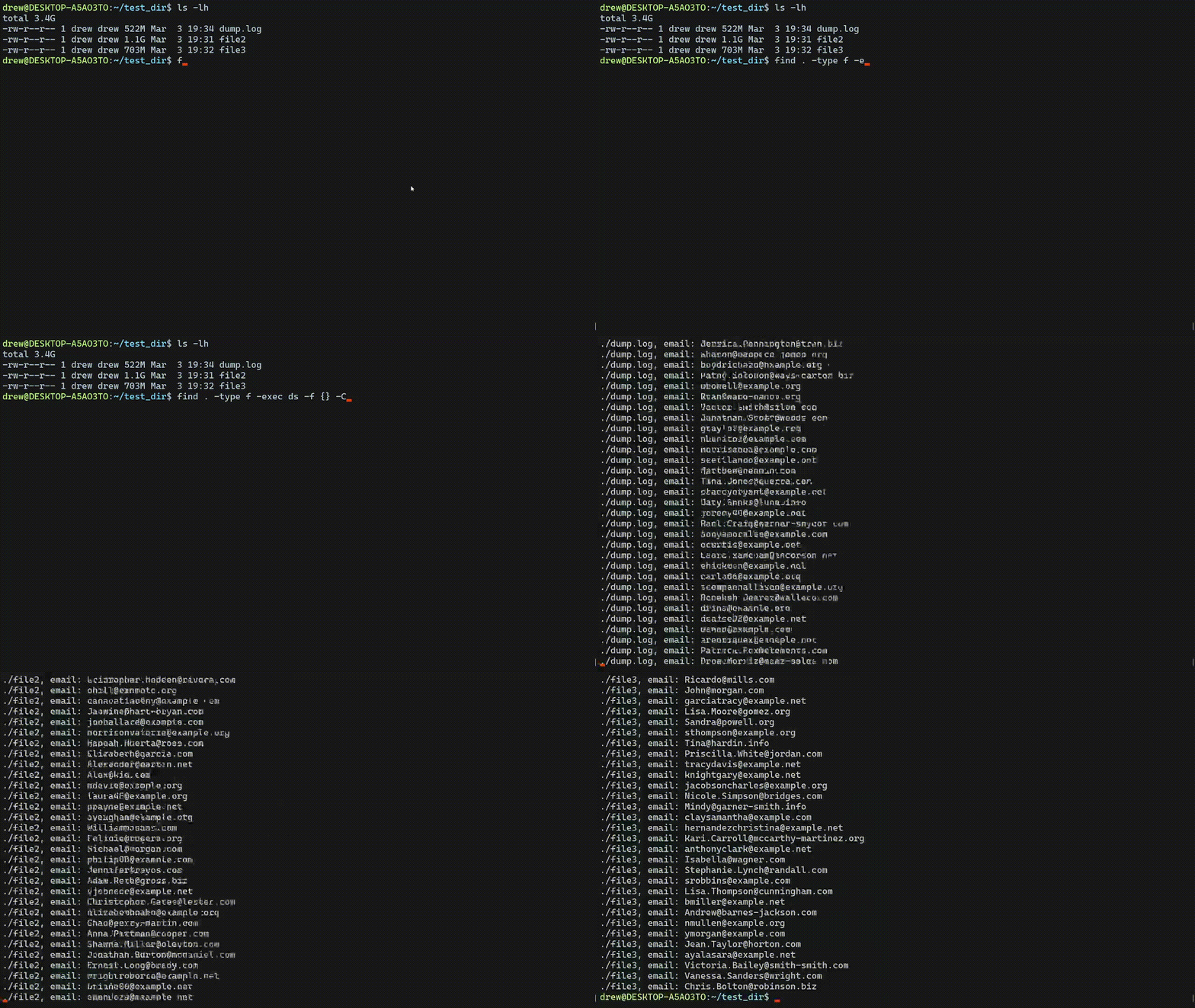
$ find . -type f -exec ds -f {} -CDe \;

Below is the elapsed time when processing a 5GB test file generated by ds-test. Each test was ran 3 times and the average time was recorded.
Ram 12.0 GB (11.9 GB usable)
Link:
[RESPONDER]

 github.com
[/RESPONDER]

- Suporta Windows, Linux e MacOS
Recursos de extração
- E-mails
- arquivos
- Números de telefone
- Cartões de crédito
- IDs de chave privada da API do Google
- Números de Segurança Social
- Chaves da AWS
- carteiras bitcoin
- URL's
- Endereços IPv4 e endereços IPv6
- Endereços MAC
- Registros DNS SRV
- Extrair Hashes
- MD4 e MD5
- SHA-1, SHA-224, SHA-256, SHA-384, SHA-512
- SHA-3 224, SHA-3 256, SHA-3 384, SHA-3 512
- MySQL 323, MySQL 41
- NTLM
- bcrypt
Quer mais?
Instalação rápida
Instale o Rust e o Github
Exemplos
Extraindo arquivos de um Webiste remoto
Aqui eu uso wget para fazer uma solicitação para stackoverflow então eu envio o corpo do texto para ds . A opção -F listará todos os arquivos encontrados. --clean é usado para remover qualquer texto extra que possa ter sido retornado (como html extra). Em seguida, o resultado é enviado para o uniq, que remove todos os arquivos não exclusivos encontrados.wget -qO - https://www.stackoverflow.com | ds -F --clean | único

Extraindo endereços Mac de um arquivo de saída
Here I am pulling all mac addresses found in autodeauth's log file using the -m query. The --hide option will hide the identifer string infront of the results. In this case 'mac_address: ' is hidden from the output. The -T option is used to check the same line multiple times for matches. Normallly when a match is found the tool moves on to the next line rather then checking again.$ ./ds -m -T --hide -f /var/log/autodeauth/log
2023-02-26 00:28:19 - Sending 500 deauth frames to network: BC:2E:48:E5:DE:FF -- PrivateNetwork
2023-02-26 00:35:22 - Sending 500 deauth frames to network: 90:58:51:1C:C9:E1 -- TestNet
Reading all files in a directory
The line below will will read all files in the current directory recursively. The -D option is used to display the filename (-f is required for the filename to display) and -e used to search for emails.$ find . -type f -exec ds -f {} -CDe \;
Speed Tests
When no specific query is provided, ds will search through all possible types of data, which is SIGNIFICANTLY slower than using individual queries. The slowest query is --files. Its also slightly faster to use cat to pipe the data to ds.Below is the elapsed time when processing a 5GB test file generated by ds-test. Each test was ran 3 times and the average time was recorded.
Computer Specs
Processor Intel(R) Core(TM) i5-10400F CPU @ 2.90GHz, 2904 Mhz, 6 Core(s), 12 Logical Processor(s)Ram 12.0 GB (11.9 GB usable)
Searching all data types
| Command | Speed |
|---|---|
| cat test.txt | ds -t | 00h:02m:04s |
| ds -t -f test.txt | 00h:02m:05s |
| cat test.txt | ds -t -o output.txt | 00h:02m:06s |
Using specific queries
| Command | Speed | Query Count |
|---|---|---|
| cat test.txt | ds -t -6 | 00h:00m:12s | 1 |
| cat test.txt | ds -t -i -m | 00h:00m:22 | 2 |
| cat test.txt | ds -tF6c | 00h:00m:32s | 3 |
Project Goals
- JSON and CSV output
- Untar/unzip and a directorty searching mode
- Base64 Detection and decoding
Link:
[RESPONDER]
GitHub - Drew-Alleman/DataSurgeon: Quickly Extracts IP's, Email Addresses, Hashes, Files, Credit Cards, Social Secuirty Numbers and more from text
Quickly Extracts IP's, Email Addresses, Hashes, Files, Credit Cards, Social Secuirty Numbers and more from text - GitHub - Drew-Alleman/DataSurgeon: Quickly Extracts IP's, Email Addresses,...
github.com
[/RESPONDER]








